Paso 1: descargue el software de captura ProDENT.
Paso 2: instale el software y elija Apteryx como software de imágenes dentales.
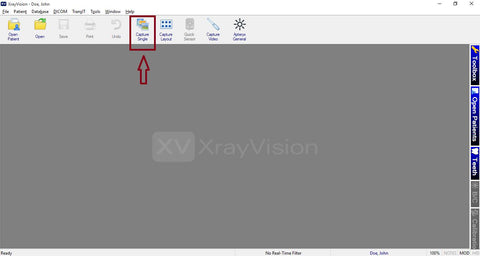
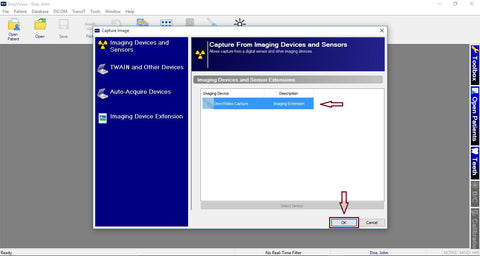
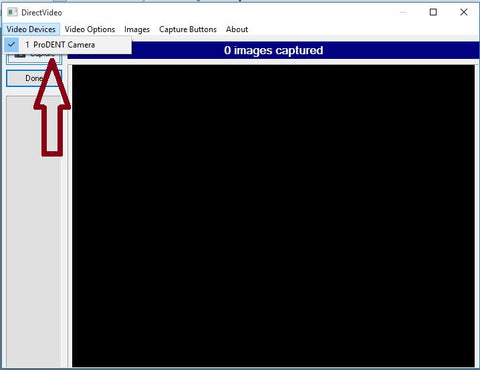
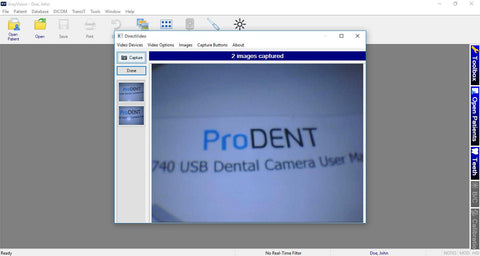
Paso 3: configurar los ajustes de XrayVision.

Paso 1: descargue el software de captura ProDENT.
Paso 2: instale el software y elija Apteryx como software de imágenes dentales.
Paso 3: configurar los ajustes de XrayVision.
Clearer Smiles, Simpler Workdays: ProDENT and CareStack Now Connected
Clearer Smiles, Simpler Workdays: ProDENT and CareStack Now Connected
15 Proven Dental Office Management Tips to Boost Efficiency and Patient Satisfaction
Are Digital X-Rays Faster Than Film X-Rays? A Comprehensive Speed Comparison
12 Proven Ways to Improve Patient Experience in Your Dental Office
Enter your email below to be the first to know about new collections and product launches.
Are you 18 years old or older?
Sorry, the content of this store can't be seen by a younger audience. Come back when you're older.